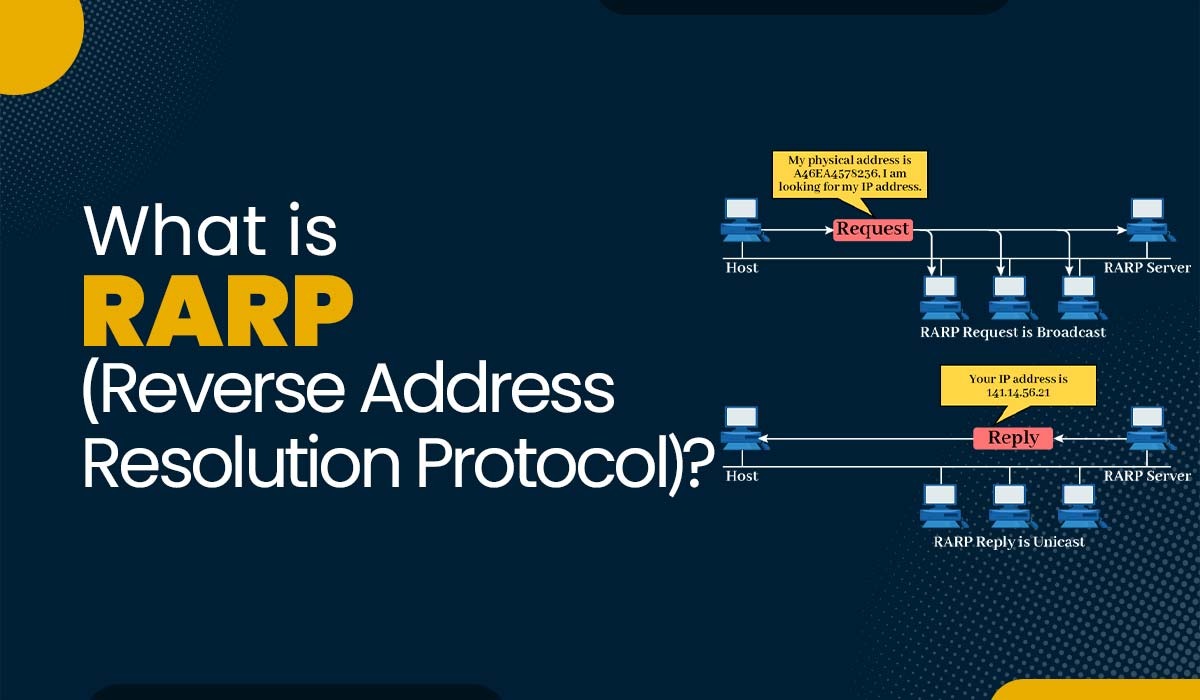
What is Reverse Address Resolution Protocol (RARP)?

Blog featured image of Blog - What is RARP (Reverse Address Resolution Protocol).

Categories

Introduction

Reverse Address Resolution Protocol, also known as reverse ARP, is a networking protocol used to link a MAC address with an Internet Protocol (IP) address. It is the inverse of the Address Resolution Protocol (ARP), which links an IP address with a MAC address. RARP was originally developed in the stages of computer networking as a means to assign IP addresses to diskless workstations or other devices that were unable to store their IP addresses. In this blog, we will explain the RARP protocol, its purpose, and how it works, along with its advantages and disadvantages.

Let’s first understand what RARP really is.

What is Reverse Address Resolution Protocol?

Reverse Address Resolution Protocol or RARP is the inverse of the more commonly used Address Resolution Protocol (ARP). ARP is a protocol that maps an IP address to a MAC address, which is needed for data link layer communication. RARP, on the other hand, maps a MAC address to an IP address, which is needed for network layer communication.

During its inception, Reverse Address Resolution Protocol was designed specifically for devices such as diskless workstations that lacked the capability to store their IP addresses. In this scenario, these devices would broadcast their MAC addresses and request an IP address. A RARP server on the network would then respond with an IP address corresponding to that MAC address.

The functionality and operation of RARP are documented in RFC 903. It functions within the data link layer of the OSI model. ARP and DHCP have largely replaced it in networks. It had a significant impact on the evolution of computer networking protocols and is still utilized in specific situations.

Now that we have a basic understanding of reverse ARP, let’s discuss its purpose.

Purpose of Reverse Address Resolution Protocol

The primary goal of the Reverse Address Resolution Protocol (RARP) is to allocate IP addresses to devices that lack storage or configuration files to store their IP addresses. These devices include workstations, embedded systems, network printers, routers, and switches.

RARP enables these devices to dynamically acquire an IP address from an RARP server. The RARP server maintains a table associating MAC addresses with corresponding IP addresses. Once obtained, the device can utilize this IP address for communication with network devices or for accessing network resources.

Additionally, the RARP protocol plays a role in preventing conflicts related to IP addresses. By ensuring that each MAC address is assigned an IP address, the RARP server prevents instances where two devices share the IP address within the network. Such conflicts can lead to communication errors and disruptions in network connectivity.

We have explained what RARP is and its purpose. Let’s move on to the working of reverse ARP.

How does Reverse Address Resolution Protocol work?
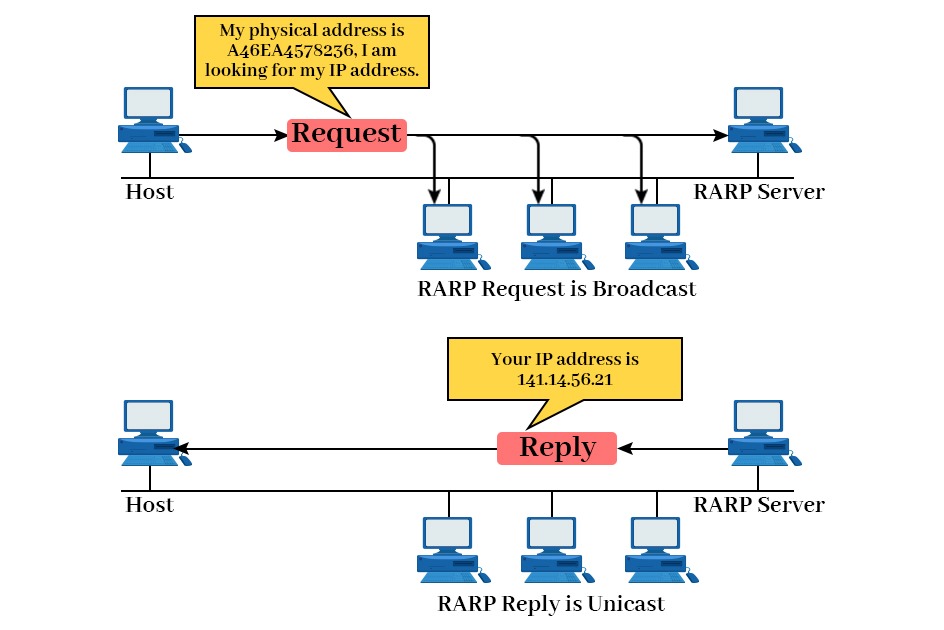
The functioning of RARP can be summarized as follows:

Working of RARP Protocol where a host requests its IP Address to RARP Server and Server replies with its IP Address
  • When a device needs an IP address, it broadcasts a RARP request packet containing its MAC address in both the sender and receiver hardware address fields.
  • A special host known as a RARP server configured on the network receives the RARP request packet. After that, it checks its table of MAC addresses and IP addresses.
  • If the RARP server finds a matching entry for the MAC address, it sends back an RARP reply packet that includes both the MAC address and the corresponding IP address.
  • The device that initiated the RARP request packet receives the RARP reply packet. After getting the reply, it then extracts the IP address from it. This IP address is then used for communication on the network.

Confused between ARP, RARP, BOOTP, and DHCP?
Learn IP addressing and address-resolution protocols step by step with real-world examples in our CCNA Training Program.

RARP Structure

The RARP packet structure is similar to ARP’s but has minor differences. The packet contains:

  • Hardware Type: Specifies the network technology (e.g., Ethernet).
  • Protocol Type: Identifies the protocol being used (usually IP).
  • Hardware Address Length: The length of the MAC address.
  • Protocol Address Length: The length of the IP address.
  • Operation Code: Specifies if it’s a request or a response.
  • Sender/Receiver Hardware Address: The MAC addresses of the sender and receiver.
  • Sender/Receiver Protocol Address: The IP addresses (if available).

Each field in the RARP packet helps the server determine which machine requests an IP and ensures the correct IP is returned.

Components of RARP

  • IP Address Assignment: RARP assists a device in learning its IP address on startup. RARP server associates the MAC address of the device to an IP and replies with it.
  • RARP Server: RARP server gets the request and then checks a table which maps MAC address to IP. If it discovers a match, it will prepare the appropriate IP.
  • RARP Reply: A server will send a RARP reply back to the client. Usually, it’s on the local network. This reply includes the IP address associated with the client’s MAC address.
  • Physical Address: The physical address refers to the device’ Mac address. RARP relies on this MAC as the key identifier on the local network to request and receive the appropriate IP address.

RARP Packet Format

RARP uses almost the same header layout as ARP. The main difference is the purpose: RARP helps a device learn its IP using its MAC address.

RARP packet format
  • Hardware Address Type: Tells what kind of hardware address is used, like Ethernet. This helps both sides interpret the MAC address field in a standard, correct way.
  • Protocol Address Type (PTYPE): Identifies the network protocol for the logical address, commonly IPv4. It tells the receiver what type of “protocol address” is being carried out.
  • Hardware length (HLEN): The size of the hardware address in bytes. For Ethernet MAC addresses, this value is usually 6, so devices know the exact address length.
  • Protocol length (PLEN): The length of the protocol’s address in bytes. For IPv4, the most common is 4. This ensures that that the IP address is read in the correct size.
  • Operation: Determines if it is either a request, or a reply. In RARP, one value signifies “request IP for this MAC,” while the other is “here is the IP.”
  • Sender Hardware Address: It is the MAC address of the person who is the sender of the packet. In a request, this will be your client’s MAC. In a reply, it’s usually that server’s MAC.
  • Sender Protocol Address: The protocol address of the sender (like the IP). In a request, the user might not know its own IP; therefore, it could be blank and set at zero.
  • Target Hardware Address: The MAC address being asked about. In a request, it is usually the client’s MAC again. In a reply, it confirms which device the IP belongs to.
  • Target Protocol Address: The protocol address for the target. In reply, this is the IP address the client needs. In a request, it is usually unknown and left blank.

Why Reverse Address Resolution Protocol Became Obsolete?

With the advancement in protocols like DHCP and BOOTP, RARP became useless. These protocols offered more features, dynamic IP allocation, and better scalability, which made RARP unnecessary in most modern networks.

As RARP became obsolete, modern networks moved to protocols like DHCP for automatic IP address assignment. These concepts are explored in more detail during practical network configuration labs in our Network Engineer Course.

Alternatives to RARP

Today, DHCP has almost entirely replaced RARP, offering a more efficient and secure way to assign IP addresses dynamically across networks.

Advantages of RARP Protocol

Some advantages of utilizing RARP include:

  • Simplification of device configuration and management for those lacking storage or configuration files for storing their IP addresses.
  • Reduction of overhead and complexity by eliminating manual assignment of individual IP addresses to each device.
  • Prevention of potential conflicts by guaranteeing that every MAC address receives a distinct IP address assigned by the RARP server.
  • Support for legacy devices that do not support newer protocols, like DHCP or BOOTP.

Disadvantages of RARP Protocol

Apart from all the advantages, RARP also has some disadvantages. Some disadvantages of using RARP are:

  • It requires a RARP server on each network segment, which increases both cost and maintenance overhead for network infrastructure.
  • Broadcasting is relied upon by RARP, causing consumption and potential network congestion.
  • There is no provision for security or authentication mechanisms to verify the identity or validity of devices requesting or receiving IP addresses.
  • It lacks support for any functionalities or choices like subnet mask, default gateway, DNS server, or lease time. These features are typically offered by protocols such as DHCP or BOOTP.

Frequently Asked Questions

Q1. What is address resolution protocol and reverse address resolution protocol?

The Address Resolution Protocol (ARP) is a protocol used in computer networks to associate an IP address with the address (MAC address) of a device. On the other hand, the Reverse Address Resolution Protocol (RARP) does the opposite by mapping a MAC address to an IP address.

Q2. What is reverse ARP name resolution?

In terms of name resolution, Reverse ARP is a network protocol that enables a device to obtain its IP address based on its address. It sends out a broadcast request containing its MAC address and waits for a response from a server that holds the IP MAC mapping.

Q3. What is RARP and Bootp?

RARP and Bootp are two protocols utilized for assigning IP addresses to devices in a network. RARP, which stands for Reverse Address Resolution Protocol, accomplishes this by sending out a broadcast request to an RARP server in order to map a MAC address to an IP address. On the other hand, Bootp (Bootstrap Protocol) is an improvement of RARP that provides additional information such as subnet mask, gateway, and hostname. Bootp uses UDP and can be routed across networks.

Q4. What layer is RARP in the OSI model?

Reverse Address Resolution Protocol or RARP Operates at layer 2 (data link layer) of the OSI model.

Conclusion

RARP, which stands for Reverse Address Resolution Protocol, is a protocol used to link a MAC address to an Internet Protocol (IP) address. However, due to its limitations, RARP is not suitable for networks. Instead, newer protocols like DHCP (Dynamic Host Configuration Protocol) have taken its place. DHCP offers flexibility and functionality in assigning IP addresses. RARP is still used in applications such as booting embedded systems and configuring network devices with pre-assigned IP addresses.

Any Questions?
Get in touch

Blog

Real Labs. Real Skill. Real Jobs

Step Into IT & Networking Mastery

Popular Courses

Network Engineer Course

Network Engineer Course

(FRESHERS / EXPERIENCED)

Network Automation Course

(FRESHERS / EXPERIENCED)

Data Analytics

Data Analytics

(FRESHERS / EXPERIENCED)

Nexus + DC ACI

(EXPERIENCED)

CCIE Enterprise

(EXPERIENCED)

Ansible & Terraform

(EXPERIENCED)

Data Analytics

Job Guarantee Courses

(FRESHERS / EXPERIENCED)

Cisco SD-WAN Course

(EXPERIENCED)

Leave a Reply

Your email address will not be published. Required fields are marked *

Republic Day

Book Your Free 1:1

Career Consultation Today!

Days
Hours
Minutes
Seconds

Clock’s ticking — Claim your discount now.

Republic Day Popup
Get Job Ready

Book Your Free 1:1

Career Consultation Today!

Republic Day Popup

This Diwali

Hours
Minutes
Seconds

Grab upto 30% off on all our courses

Diwali 2025
Diwali pop up image