



Introduction
Every time you browse a website, transfer a file, join a video call or play an online game, network protocols help deliver data between devices. Two important transport-layer protocols, TCP (Transmission Control Protocol) and UDP (User Datagram Protocol), handle this communication differently. Understanding their differences helps you identify which protocol best suits an application’s requirements.
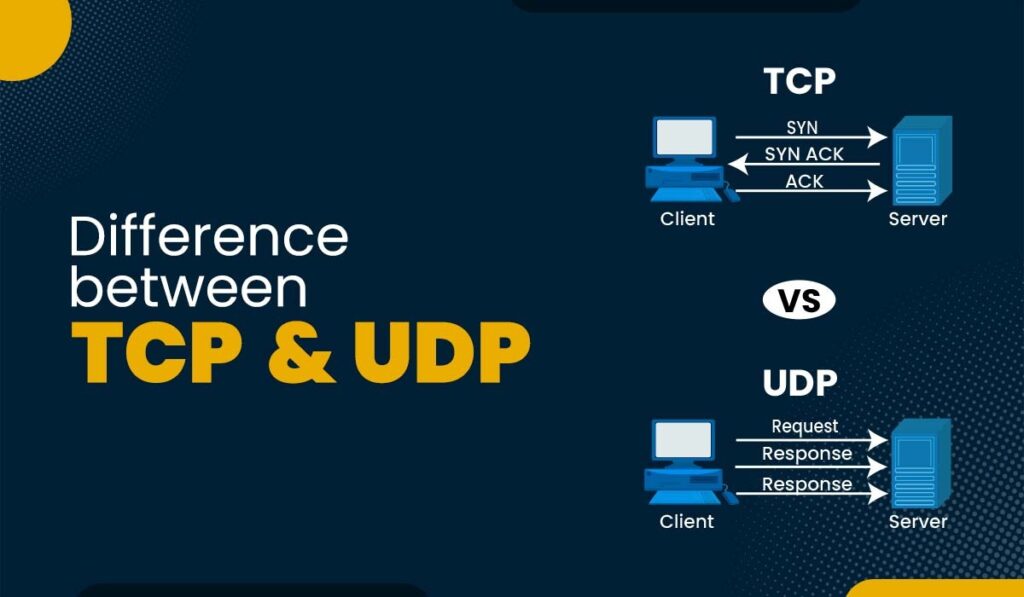
The main difference between TCP and UDP is how they handle data delivery. TCP provides a reliable, ordered stream of data with retransmission, flow control and congestion control. UDP sends independent datagrams with lower protocol overhead and no built-in delivery or ordering guarantees. Let’s explore how these protocols work, their key differences, advantages and common applications.
TCP vs UDP
The main difference between TCP and UDP is that TCP is connection-oriented, ensuring reliable data delivery with error checking and retransmission, while UDP prioritizes speed over guaranteed delivery and is connectionless. Here are some other differences between these protocols –
| Parameters | TCP (Transmission Control Protocol) | UDP (User Datagram Protocol) |
| Connection | Connection-oriented protocol | Connectionless protocol |
| Reliability | Reliable delivery of data with error detection and correction | Unreliable delivery of data without error detection or correction |
| Ordering | Guarantees in-order delivery of data | No guarantee of in-order delivery of data |
| Congestion | Includes congestion control mechanisms | No built-in congestion control mechanisms |
| Packet Structure | Contains header and payload information | Contains minimal header information |
| Use Cases | Suitable for applications requiring data integrity and accuracy | Suitable for applications that prioritize speed and efficiency |
TCP and UDP are not interchangeable in every situation. The appropriate choice depends on whether an application prioritises reliable, ordered delivery, low overhead, low latency or specific communication requirements.
What is TCP?
Transmission Control Protocol (TCP) is a connection-oriented transport-layer protocol that provides applications with a reliable, ordered stream of bytes. It uses sequence numbers, acknowledgements, checksums and retransmissions to detect data loss or corruption and recover from transmission problems.
TCP also provides flow control and congestion control. Flow control helps prevent a sender from overwhelming the receiver, while congestion control adjusts transmission behaviour to respond to network conditions.
How TCP Works?
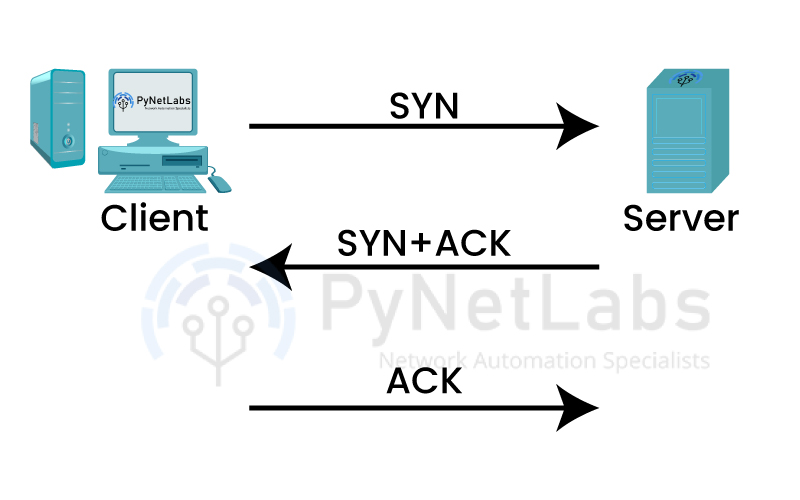
TCP establishes a connection before transferring application data. It commonly uses a three-way handshake to synchronise the communicating devices.
The three steps are:
- SYN (Synchronise): The client sends a SYN segment to request a TCP connection and initiate sequence-number synchronisation.
- SYN-ACK (Synchronise-Acknowledge): The server responds with a SYN-ACK segment to acknowledge the request and provide its own initial sequence number.
- ACK (Acknowledge): The client acknowledges the server’s sequence number, completing the handshake.
After the connection is established, TCP transfers data using sequence numbers and acknowledgements. If data is lost, TCP can retransmit it. The receiving application gets the byte stream in order, even if segments arrive out of order.
Features of TCP
TCP offers several features that support reliable communication between applications. Its main features include the following:
- Reliable Delivery: Acknowledgements and retransmissions help recover from lost data.
- Error Detection: TCP checksums help detect corruption in TCP segments.
- Ordered Delivery: Sequence numbers allow TCP to deliver the byte stream to the application in the correct order.
- Flow Control: The receiver advertises how much data it can accept, helping prevent buffer overload.
- Congestion Control: TCP adjusts its sending behaviour to respond to network congestion.
- Full-duplex Communication: Both endpoints can send and receive data over the same connection.
Advantages of TCP
TCP is suitable for applications where reliable, ordered delivery is important. The following advantages explain why it is widely used.
- Reliable Data Delivery: TCP uses acknowledgements and retransmissions to recover from lost segments, subject to connection and network conditions.
- Ordered Data Delivery: The receiving application gets bytes in the correct sequence.
- Error Recovery: TCP can retransmit lost data and recover from certain transmission errors.
- Flow Control: TCP helps prevent a sender from overwhelming the receiving device.
- Congestion Control: It adjusts transmission behaviour to help manage network congestion.
- Wide Application Support: TCP is used by many established application protocols, including SSH and several web and email protocols.
Disadvantages of TCP
TCP’s reliability features introduce additional protocol overhead and can make it less suitable for some latency-sensitive applications. Its main limitations include the following:
- Connection Setup Overhead: Establishing a TCP connection requires a handshake before ordinary data transfer begins.
- Retransmission Delays: Lost data may need to be retransmitted before the receiving application can consume subsequent bytes in the stream.
- Head-of-line Blocking: Missing data can delay delivery of later bytes on the same TCP connection.
- Protocol Overhead: TCP maintains connection state and uses acknowledgements, flow control and congestion control.
- Not Ideal for Every Real-time Application: Applications that prioritise timely updates over retransmission may prefer UDP, depending on their design.
Where TCP is used?
TCP is used by applications and protocols that benefit from reliable, ordered data delivery. Common examples include:
- Web Communication: HTTP/1.1 and HTTP/2 commonly use TCP to exchange web requests and responses.
- File Transfers: FTP and SFTP use TCP for transferring files. SFTP operates over SSH.
- Remote Access: SSH and Telnet use TCP to establish remote terminal connections; SSH provides encryption, whereas Telnet does not.
- Email: Protocols such as SMTP, IMAP and POP3 commonly use TCP.
- Database Connections: Many database protocols use TCP to exchange queries and results reliably.
- VPN Connections: Some VPN protocols use TCP, although others use UDP or different transport mechanisms. The choice depends on the VPN protocol and configuration.
HTTP/3 is an important exception to the idea that modern web traffic always uses TCP. It uses QUIC, which runs over UDP and provides its own reliability, congestion control and stream management.
What is UDP?
User Datagram Protocol (UDP) is a connectionless transport-layer protocol that sends independent messages called datagrams. Unlike TCP, UDP does not establish a connection through a handshake or provide built-in acknowledgements, retransmissions, ordered delivery or transport-layer congestion control.
UDP has a fixed header of 8 bytes, which is smaller than TCP’s minimum 20-byte header. This reduces transport-layer overhead, making UDP useful for applications that need low latency or control their own delivery mechanisms.
However, UDP is not automatically faster than TCP in every situation. Actual performance depends on factors such as network conditions, packet size, application design and the reliability mechanisms required.
How UDP Works?
UDP allows an application to send a datagram without establishing a transport-layer connection first. The datagram contains source and destination port numbers, a length field, a checksum and the application data.
The receiving device uses the destination port to deliver the datagram to the appropriate application. UDP itself does not confirm successful delivery, retransmit lost datagrams or reorder datagrams that arrive out of sequence. Applications can implement their own reliability, sequencing or congestion-control mechanisms when required.
Features of UDP
UDP provides a lightweight transport service with fewer built-in mechanisms than TCP. Its main features include the following:
- Connectionless Communication: UDP sends datagrams without establishing a connection first.
- Low Header Overhead: Its fixed header is only 8 bytes.
- No Built-in Retransmission: UDP does not automatically resend lost datagrams.
- No Delivery-order Guarantee: Datagrams may arrive out of order or not arrive at all.
- Checksum-based Error Detection: UDP uses a checksum to help detect corruption, subject to the applicable IP version and checksum rules.
- Broadcast and Multicast Support: UDP can be used with IPv4 broadcast and IP multicast where the application and network support them.
Advantages of UDP
UDP is useful when applications need a lightweight transport mechanism or can handle delivery behaviour themselves. Its main advantages include the following:
- Low Overhead: The small header reduces transport-layer overhead.
- No Connection Handshake: Applications can send datagrams without first establishing a TCP-style connection.
- Low-latency Potential: Avoiding built-in retransmission can prevent waiting for missing data when timely delivery matters more than complete delivery.
- Suitable for Real-time Communication: Voice, video and interactive applications can use UDP when late data is less useful than current data.
- Flexible Application Control: Developers can implement application-specific reliability, timing and congestion-management mechanisms where needed.
- Multicast Support: UDP can support efficient one-to-many delivery when used with IP multicast.
UDP does not inherently reduce network congestion. Applications using UDP still need to account for network capacity and congestion where appropriate.
Disadvantages of UDP
UDP’s minimal transport-layer mechanisms also create limitations for applications that require reliable communication. Its main disadvantages include the following:
- No Built-in Delivery Guarantee: The sender is not automatically informed if a datagram is lost.
- No Automatic Retransmission: Lost datagrams are not resent by UDP itself.
- No Guaranteed Ordering: Applications must handle sequencing if the order of data matters.
- No Built-in Flow Control: UDP does not automatically regulate sending based on the receiver’s available buffer space.
- No Built-in Congestion Control: Applications must account for congestion through suitable mechanisms when required.
- Less Suitable for Unmodified Reliable Transfers: Applications that require complete, ordered data must implement these features themselves or use a protocol that provides them.
Where UDP is used?
UDP is common in applications where low overhead, low latency or datagram-based communication is useful. Examples include:
- DNS: Many DNS queries use UDP, although TCP is also used in cases such as zone transfers and certain larger responses.
- Voice and video communication: Real-time media applications often use UDP to avoid delays caused by transport-level retransmissions.
- Online gaming: Games may use UDP for frequent state updates where newer information can be more useful than delayed data.
- DHCP: DHCP uses UDP for address assignment and configuration exchanges.
- TFTP: The Trivial File Transfer Protocol uses UDP for simple file transfers, with its own acknowledgement and retransmission behaviour.
- HTTP/3: HTTP/3 uses QUIC over UDP. QUIC provides reliability and congestion control above UDP rather than relying on UDP itself to provide them.
Difference between TCP and UDP
The comparison table provides an overview, but understanding how the protocols behave helps explain when each is appropriate. The following sections compare their key characteristics in more detail.
1. Connection
TCP is connection oriented. Before ordinary application data is exchanged, the endpoints normally establish a connection using the three-way handshake.
UDP is connectionless. An application can send a datagram without performing a transport-layer handshake. Applications may still maintain their own sessions or state above UDP.
2. Reliability
TCP provides reliable byte-stream delivery using acknowledgements, sequence numbers and retransmissions. This helps recover from data loss, although a connection can still fail before an application completes its task.
UDP does not provide built-in delivery guarantees or retransmissions. If an application requires reliability over UDP, it must implement those mechanisms itself or use a protocol such as QUIC.
3. Ordering of Messages
TCP delivers bytes to the receiving application in order. If segments arrive out of sequence, TCP buffers the data as needed and recovers missing bytes through retransmission.
UDP does not guarantee datagram order. An application that needs to process messages in sequence must add its own sequencing and reordering logic.
4. Weight
TCP has a minimum header size of 20 bytes, which can increase when options are included. Its header supports fields and mechanisms required for connection management, sequencing, acknowledgements and flow control.
UDP has a fixed 8-byte header containing source port, destination port, length and checksum fields. This makes its transport header smaller, but the actual performance difference depends on the application and network.
5. Speed
UDP can reduce delay by avoiding connection setup and transport-level retransmission requirements. This can be useful when an application values timely updates more than recovering every lost message.
TCP may introduce additional delay during connection setup or recovery from packet loss. However, it can perform efficiently and provide high throughput on modern networks. Neither protocol is universally faster; performance depends on the use case and network conditions.
6. Flow-control
TCP provides flow control to protect the receiver from being overwhelmed and congestion control to adapt its sending rate to network conditions.
UDP does not provide these mechanisms at the transport layer. An application using UDP may implement its own flow or congestion control, and protocols such as QUIC provide these capabilities above UDP.
Similarities Between TCP and UDP
Although TCP and UDP handle delivery differently, both play an important role in network communication. They share several characteristics.
- Transport-layer Protocols: Both operate at the transport layer of the TCP/IP model and support communication between applications.
- Use of Port Numbers: Both use source and destination port numbers to help identify applications and direct data to the appropriate endpoint.
- Dependence on IP: Both are carried over IP, which provides addressing and packet delivery across interconnected networks.
- Checksum Support: Both include checksums for detecting certain forms of data corruption, subject to the relevant protocol rules.
- Support for Multiple Applications: Both allow devices to exchange data for multiple application services using different port numbers.
- Use Across Different Networks: Both can operate over IP networks, including wired, wireless and internet-connected environments.
When to Use TCP vs UDP?
The choice between TCP and UDP depends on the application’s requirements for reliability, ordering, latency and congestion management. Consider the following guidelines when selecting a transport protocol.
Choose TCP When:
TCP is generally suitable when the application needs a reliable, ordered stream of data.
- Transferring files that must arrive completely and correctly.
- Accessing websites using HTTP/1.1 or HTTP/2.
- Establishing remote sessions using SSH.
- Exchanging email through protocols such as SMTP and IMAP.
- Communicating with services that rely on TCP-based application protocols.
Choose UDP When:
UDP is useful when an application needs datagrams with low overhead or must prioritise timely delivery. The application should account for any reliability or congestion-management requirements.
- Supporting real-time voice and video communication.
- Sending frequent online-game updates where delayed information may be less useful.
- Performing many DNS queries.
- Assigning network configuration through DHCP.
- Running protocols such as QUIC, which implements reliability and congestion control above UDP.
The decision is not simply about choosing speed over reliability. Application requirements and the mechanisms implemented above the transport layer also determine which protocol is appropriate.
Conclusion
TCP and UDP are essential transport-layer protocols that serve different networking needs. TCP provides reliable, ordered data delivery, making it suitable for file transfers and web communication. UDP offers lower overhead and supports applications that prioritise timely data delivery, such as online gaming and real-time media. TCP and UDP are a part of advanced network training, if you want to learn more about these protocols, you can learn it with CCNP ENCOR Training. Understanding their differences helps networking professionals choose appropriate protocols and troubleshoot network communication effectively.
Frequently Asked Questions
Q1. Which Protocol is Better for Gaming, TCP or UDP?
UDP is generally preferred for online gaming because it avoids built-in retransmission delays and supports time-sensitive data delivery. However, the best choice depends on the game’s requirements, as some games use TCP for specific functions.
Q2. Can TCP and UDP use the Same Port Number?
Yes, TCP and UDP can use the same port number because they maintain separate transport-layer port spaces. For example, DNS commonly uses both TCP port 53 and UDP port 53 for different communication requirements.
Q3. What Happens When a UDP Packet is Lost?
UDP does not automatically retransmit lost packets or guarantee delivery. The receiving application may tolerate the loss, request retransmission or use its own recovery mechanism, depending on the application’s requirements.
Q4. Why Does HTTP/3 Use UDP Instead of TCP?
HTTP/3 uses QUIC, which runs over UDP. QUIC provides features such as reliable data delivery, congestion control and secure connections at a higher layer, helping HTTP/3 reduce certain connection and stream-related delays.
Q5. How Do You Identify Whether an Application Uses TCP or UDP?
You can identify the transport protocol by checking the application’s documentation or examining network traffic with tools such as Wireshark. In a packet capture, inspect the transport-layer protocol and source and destination port numbers to determine whether the traffic uses TCP or UDP.