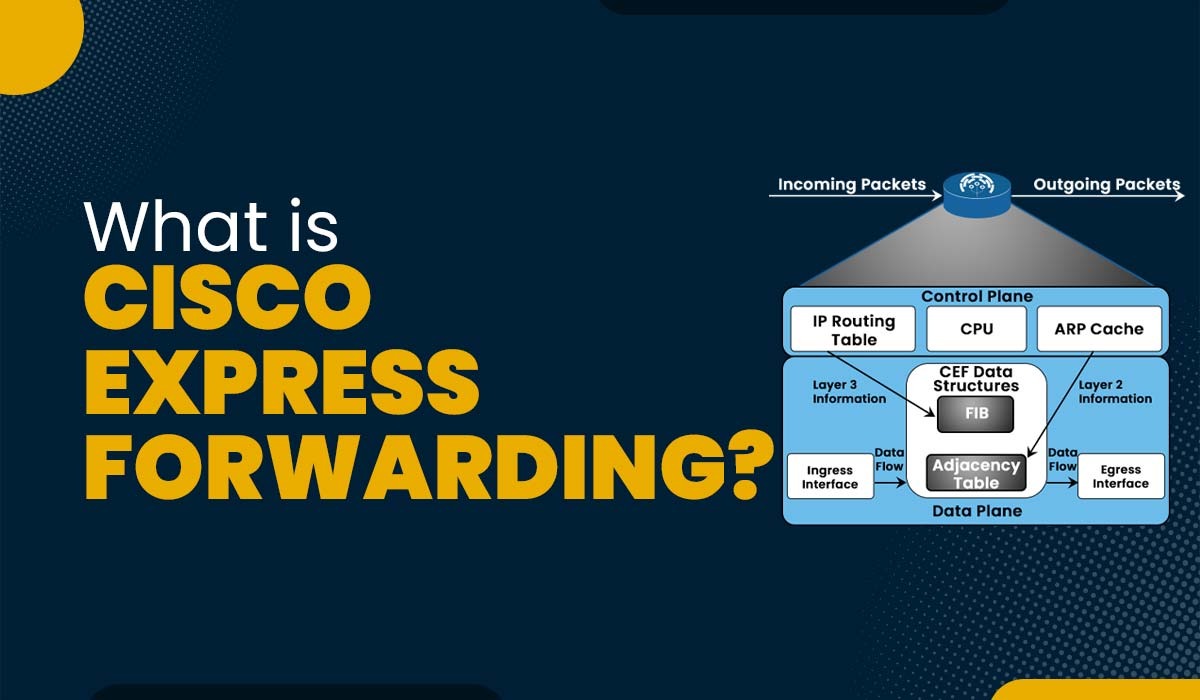
What is Cisco Express Forwarding?
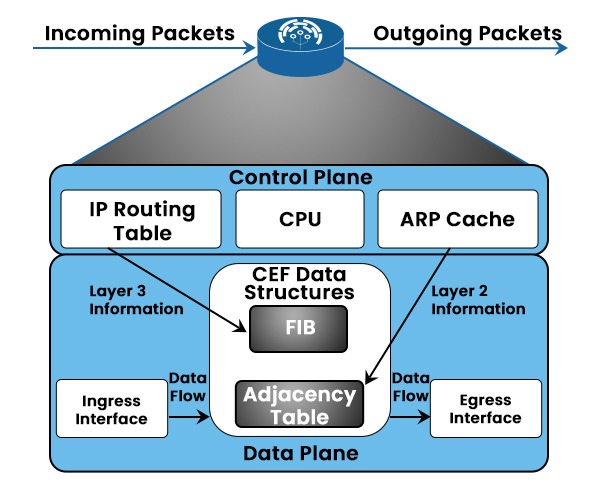
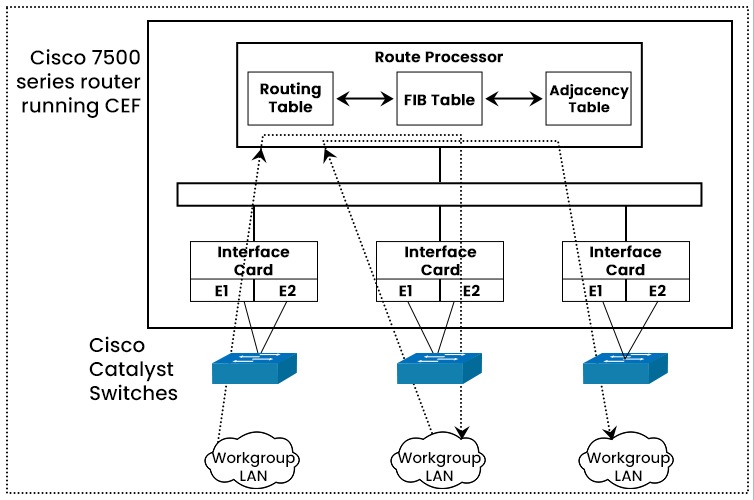
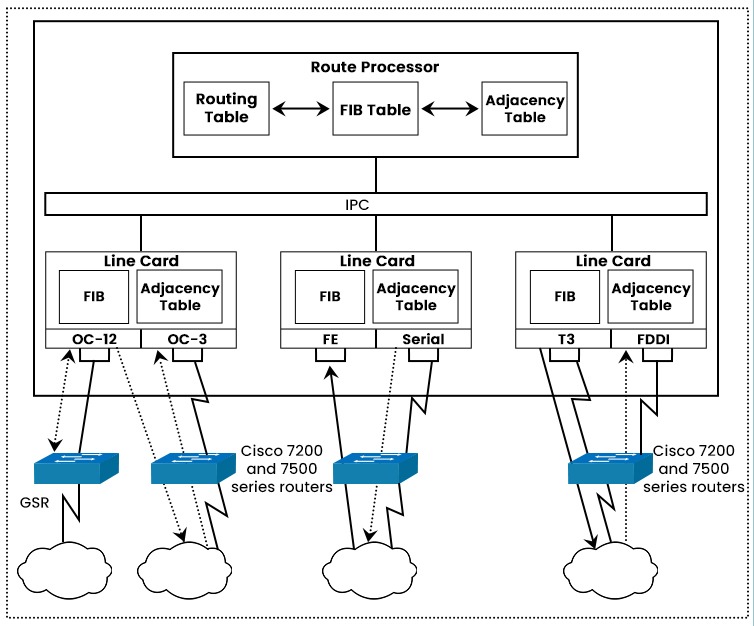
You might have heard of CEF if you are working closely with network switches and routers. Cisco Express Forwarding or CEF is an advanced layer 3 switching technology that is used particularly in large networks or the Internet in order to enhance the overall performance of the network. CEF is a kind of feature that allows a router to quickly and successfully find a route by using a special type of database referred to as the Forwarding Information Base (FIB) and an adjacency table. In this blog, we will explain what CEF in networking is, its brief history, how it works, its components, and its benefits and drawbacks. Before getting into more details, let’s first understand what CEF really is. CEF or Cisco Express Forwarding is a form of packet switching technology that uses the destination IP address of a packet to decide the next hop for forwarding. It allows a router to do path lookup effectively. By building a unique searchable tree structure based on the IP routing table, CEF streamlines routing table lookup. Unlike process switching, which includes the router’s CPU in each packet forwarding decision, CEF performs the route lookup in hardware, which reduces the CPU load and increases the throughput. Unlike fast switching, which caches the next hop records for information for often-used locations, CEF maintains a complete copy of the routing table in a FIB, which eliminates the need for cache maintenance and guarantees regular forwarding behavior. Now that we have an understanding of CEF in networking. Let’s move on to the history of CEF. When CEF was not developed, process switching and fast switching were the two mechanisms utilized by Cisco routers to switch packets. The initial technique, i.e., process switching, included the router’s CPU looking up the routing table for each packet and forwarding it to the interface. This was called process switching. For big networks with several destinations, process switching was slow and CPU-intensive. After that, there were some improvements, and fast switching was introduced. In order to store the routing information for previously routed packets, fast switching uses a cache. Fast switching enhanced throughput and decreased CPU burden, but it was not without its drawbacks. For instance, policy-based routing, quality of service, and multicast routing were not supported by fast switching. In order to overcome the drawbacks of fast switching and offer improved performance and scalability, CEF was launched in the middle of the 1990s. Without using the CPU, CEF switched packets using a pre-built FIB and adjacency table. All the functionalities that fast switching did not offer were also supported by CEF. We have discussed the history of CEF and how it comes into action to overcome the limitations. Let’s now understand the components of CEF. The main components of CEF are: The FIB is a data structure that carries all of the forwarding records for each destination within the routing table. The FIB entries include the destination prefix, the subsequent hop address, the outgoing interface, and any extra information along with Quality of Service (QoS) or MPLS labels. The FIB is saved inside the memory of the router and updated by way of the routing protocols each time there is any change within the network topology. The FIB is created and maintained by using the router’s CPU based on the IP routing table. The FIB is also distributed to all line cards or interfaces that are supported by CEF in order to perform the route lookup locally. The adjacency table is a data structure that contains the layer 2 information for every subsequent hop inside the FIB. The adjacency table entries include the next hop address, the layer 2 header, and any additional information along with QoS or MPLS labels. The Adjacency Table is saved inside the memory of the router and updated by way of ARP or different Layer 2 protocols each time there is a change within the Layer 2 information. The adjacency table is also distributed to all line cards or interfaces that are supported by CEF in order to append the correct layer 2 headers to each packet before forwarding it. Now, we have a basic understanding of the components of CEF. Let’s move on to the working of CEF. CEF works by following these steps: CEF can operate in one of two modes: central or distributed. In central CEF mode, all packets are routed by the router’s CPU, which also contains the FIB and adjacency database. When line cards or interfaces do not support CEF or when some features conflict with distributed CEF mode, central CEF mode may be employed. Even while central CEF mode does not offer all of CEF’s advantages, it is still quicker than process switching or fast switching. The FIB and adjacency table are distributed to all line cards or interfaces that support CEF when using distributed CEF mode, and all packets are routed locally by the line cards or interfaces. Since it reduces CPU burden and boosts throughput, distributed CEF mode offers the highest performance and scalability for CEF. Additionally available in distributed CEF mode are functions like load balancing, QoS, NetFlow, and MPLS. CEF can perform load balancing across multiple paths to the same destination. CEF load balancing can be per-destination or per-packet. All packets in a flow are transmitted over the same path when using per-destination load balancing, preserving packet order but perhaps underutilizing bandwidth. Per-packet load balancing is an optional mode for CEF. In this mode, CEF alternates each packet across the available paths in a round-robin fashion. Per-packet load balancing provides a more even distribution of traffic across the paths, but it also introduces the possibility of out-of-order delivery, which can affect some applications such as TCP. Let’s now discuss the advantages and disadvantages of CEF. CEF offers various advantages, some of these are: Apart from all the advantages, CEF has some disadvantages also. Some of these are: These are the advantages and Disadvantages of Cisco Express Forwarding. A proprietary type of scalable switching called Cisco Express Forwarding (CEF) switching was created to address the issues related to demand caching. The information that is typically saved in a route cache is divided over different data structures when CEF switching is used. Fast switching and Cisco Express Forwarding are both cache-based packet-switching methods. Fast switching relies on a demand-based cache that is built by process switching. Cisco Express Forwarding uses a pre-built cache that contains both Layer 2 and Layer 3 information for faster and more efficient switching. Two main components of Cisco Express Forwarding are: Cisco Express Forwarding (CEF) is a packet-switching technique that optimizes the performance and scalability of network routers. CEF uses two main mechanisms to forward packets: the Forwarding Information Base (FIB) and the Adjacency Table. Cisco Express Forwarding is a packet-switching technique that enables routers to forward packets faster and more efficiently. In this blog, CEF explained in detail, its history, how it comes into action, and how it assists in eliminating the limitations that other switching types had before. We also have explained the functioning of CEF along with its different modes. Various advantages and disadvantages of using CEF have also been explained.Introduction
What is CEF in Networking?
History of Cisco Express Forwarding
Components of Cisco Express Forwarding
FIB (Forward Information Base)
Adjacency Table
How does Cisco Express Forwarding works?
Cisco Express Forwarding Modes
Central CEF Mode
Distributed CEF Mode
CEF Load Balancing
Per-Destination
Per-Packet
Advantages of Cisco Express Forwarding
Disadvantages of Cisco Express Forwarding
Frequently Asked Questions
Q1. What does Cisco Express Forwarding do?
Q2. What is the difference between fast switching and Cisco Express Forwarding?
Q3. What are the two main components of Cisco Express Forwarding?
Q4. Which Cisco Express Forwarding mechanism?
Conclusion