What is the difference between Packet and Frame?
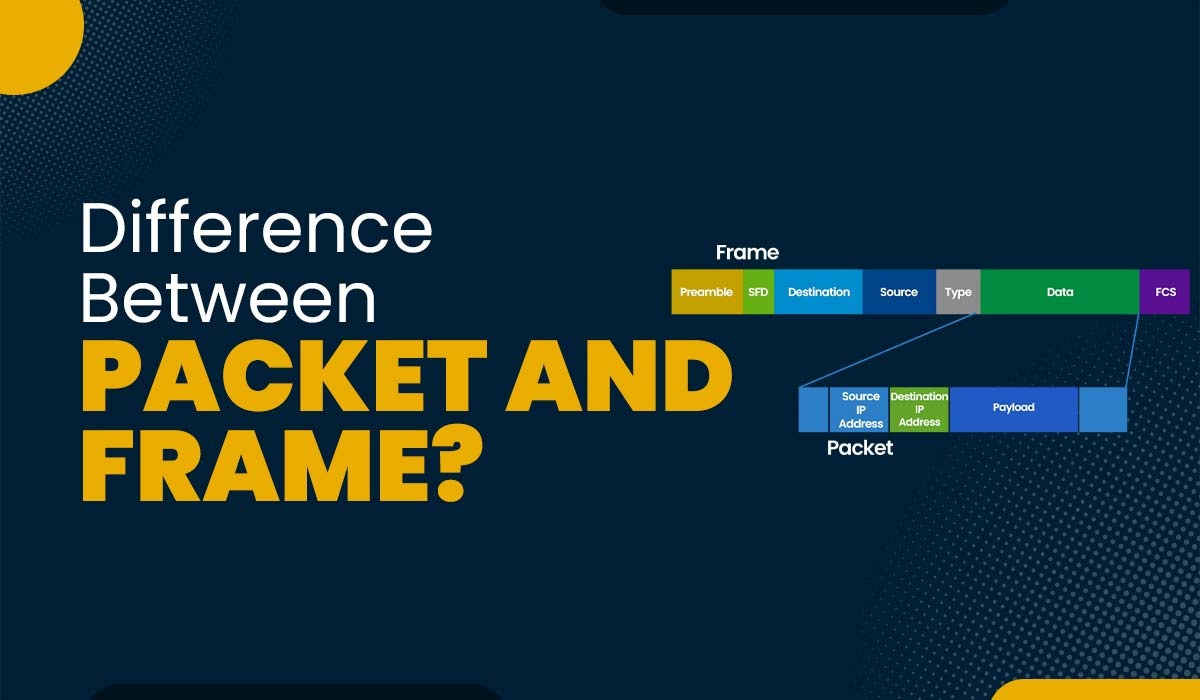
Blog Featured image with text - Difference between Packet and Frame with a pic showing the frame format

Categories

Introduction

In computer networks, data is sent between devices using protocols and layers. Each layer has its way of packaging and handling data. There are two types of data units: packets and frames. Packets are used in the network layer, while frames are used in the data link layer. But what is the fundamental difference between packet and frame? In this blog, we will discuss the difference between the two and define the frame and the packet in detail.

Before getting into more details, let’s first understand the difference between Packet and Frame.

Frame vs Packet

Below, we have explained the difference between packet and frame in a tabular form based on different factors.

FactorsFramePacket
OSI LayerA frame is a data unit at the Data Link LayerA packet is a data unit at the Network Layer
AddressingUses physical (MAC) addresses of source and destination devicesUses logical (IP) addresses of source and destination devices
CorrelationEncapsulates packetsEncapsulates segments
FieldsContains preamble, type, data, and CRC fieldsContains source IP, destination IP, TTL, identification, protocol type, version, options, and data fields
FunctionResponsible for error detection and correction, flow control, and media access controlResponsible for routing, fragmentation, and reassembly of data across networks

Now, that we have a basic understanding of the difference between packet and frame. Below we have explained what a frame and packet really are.

What is Frame in Computer Network?

Frames are the building blocks of the OSI model data link layer. This layer facilitates data transfer between neighboring nodes within a network, such as two computers connected by a cable or wireless link. The data link layer also encompasses functions like error detection, correction flow control, and medium access control.

A frame comprises three components: a header, a payload, and a trailer.

  • The header carries details like the source and destination MAC addresses. The sender and the source MAC addresses represent the addresses of devices on the network.
  • Meanwhile, the payload contains the transmitted data, like an IP packet or an ARP request.
  • The trailer includes a checksum or cyclic redundancy check (CRC) that helps identify any errors in the frame.

The format and size of a frame depend on the type of data link protocol that is used, such as Ethernet, Wi-Fi, Bluetooth, etc. For example, an Ethernet frame can have a maximum size of 1518 bytes, while a Wi-Fi frame can have a maximum size of 2346 bytes.

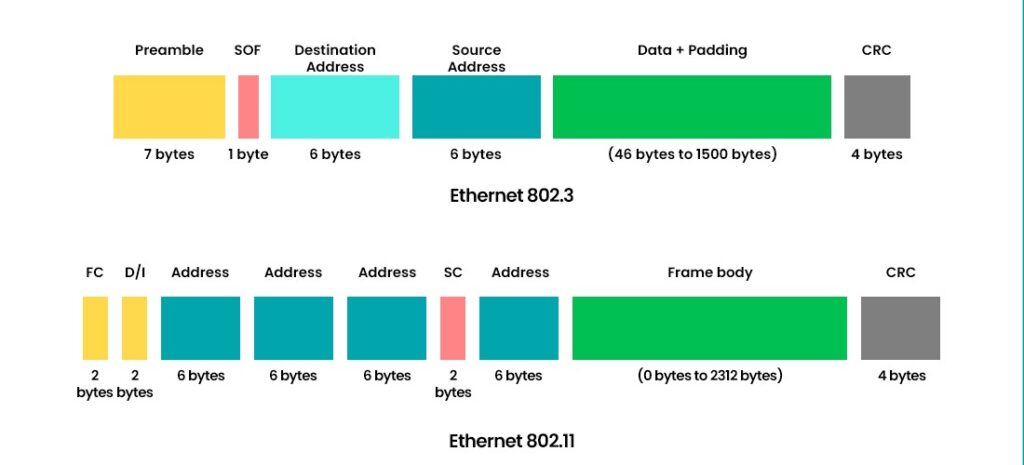
Below, you can see the frame format.

Showing the frame format in Ethernet 802.3 and Ethernet 802.11

Functions of Frame

Frames are responsible for node-to-node communication at a local scale. Some key functions of frame are:

  • Error Detection: The Frame footer contains a CRC that allows the receiving device to detect any error that happened during transmission.
  • Flow and Access Control: Frames allow the transmission of data in an orderly manner and also enables the sharing of same communication medium without collision for multiple devices.

Advantages of Frames

Here are some advantages associated with frames:

  • Frames are best for short distance and node-to-node communication, such as within LANs.
  • Since Frames are used in local networks, they offer lower latency.
  • The use of CRC allows for efficient error detection.
  • Frames allow quick identification of devices with the use of MAC Addresses.

Disadvantages of Frames

Here are some disadvantages of Frames:

  • Frames are only for local networks and are not suitable for long-distance communication.
  • Frames are more prone to failure as it depends highly on local network infrastructure and if 1 node fails, communication will halt.
  • It can lead to collisions if the LAN environment is busy.
  • It doesn’t support fragmentation.

What is a Packet in Computer Networks?
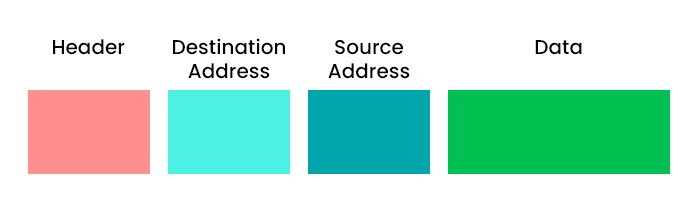
Another data unit is commonly known as a packet within the network layer of the OSI model. The network layer allows the transmission of data across different networks like the Internet. The network layer carried out responsibilities such as routing, logical addressing, fragmentation and reassembly congestion control, and quality of service.

A packet comprises two components: a header and a payload.

  • The header stores details such as source and destination IP addresses representing the addresses of devices on the network.
  • On the other hand, the payload contains the data being transmitted, like a TCP segment or an ICMP message.

The format and size of packets vary depending on the network protocol employed, such as IPv4 or IPv6. For instance, an IPv4 packet can have a size of 65535 bytes, while an IPv6 packet can reach up to 65575 bytes in size.

Below, we have shown the packet format for better understanding.

Showing the packet format containing 4 parts - Header, destination address, source address, and Data.

Functions of Packets

The primary function of Packets is end-to-end communication within complex networks. Some other key funcations are:

  • Routing: Packets are routed among multiple networking devices until they reach the final destination.
  • Segmentation and Reassembly: Large data is often divided into smaller packets and then reassembled at the receiving end.
  • Error Detection: Some Packets contain mechanisms to detect errors and retransmit data.

Advantages of Packets

Some advantages of packets are:

  • It is capable of optimizing bandwidth usage as data is broken into smaller packets and takes different routes to the destination.
  • Packets are capable travelling through different types and scales of networks.
  • Packet-based communication protocols, such as TCP, can detect lost packets and request their retransmission, ensuring data integrity.

Disadvantages of Packets

Some disadvantages of packets are:

  • There is overhead associated with packets as each packet contains a header with addressing and control information leading to a slight overhead.
  • Large packets are divided into multiple packets and then reassembled at the destination, if the packets are lost during transmission, additional processing is required.
  • Routers and switches process each packet individually, which can introduce delays, especially in large networks.

Below, we have explained the difference between frame and packet in detail and some examples.

Difference Between Packet and Frame

One of the main difference between Packets and Frame is that a packet is a unit of data at the network layer that contains network addresses and payload, while a frame is a unit of data at the data link layer that includes physical addresses and error-checking bits. Some of the other difference between packet and frame are:

FactorsFramePacket
PDU NameFramePacket (IP packet / datagram)
Devices That Handle ItSwitch, Bridge, NICRouter, Layer-3 switch
Header / TrailerHas header + trailer (trailer usually contains FCS/CRC)Mostly header only (IP header; no L2 trailer)
Error DetectionUses FCS/CRC for detecting errors on the linkIPv4 has header checksum (IPv6 doesn’t); focuses more on routing than link error detection
ExamplesEthernet frame, Wi‑Fi (802.11) frameIPv4 packet, IPv6 packet

PDU Name

Frame: At Layer 2, the PDU is known as frame. It is the unit of data that is used to communicate via a local link (like Ethernet or Wi-Fi).

Packet: At Level 3, the PDU is known as a packet (IP packet). It is the unit of information that is used to communicate across networks.

Devices That Handle It

Frames: Frames typically controlled through switches, bridges along with networking cards (NICs) inside a network.

Packet: The packets used on the Internet are processed through routers (and Layer-3 switches) to transfer data across various networks.

Header / Trailer

Frame: The frame typically includes a header and trailer. The trailer usually has the FCS/CRC used for error-checking in the frame.

Packet: A packet has an IP header and payload, and it doesn’t contain a Layer-2 trailer.

Error Detection

Frame: Error-detection is carried out in the data link layer by using CRC/FCS that helps to detect errors as the frame travels through the local link.

Packet: The IP layer concentrates more on routing rather than error-checking. IPv4 uses a checksum to verify the header while IPv6 doesn’t have an underlying checksum for headers.

Does Packet and Frame work together?

Yes, packet and frame can work together. Although, packet and frame serve different purposes, they come together to ensure smooth data transmission across network. The data starts as a packet at the network layer and IP Addresses are used to define the source and destination.

As it moves down the OSI layers, it is encapsulated into a frame at the Data Link Layer. Then, the frame is transmitted over the Local network to the next hop. Once the frame reached the destination, the Data Link Layer processes it and removes the header and footer. Then, the packet is passed to the network layer. If the destination is not the same of that packet, then it is encapsulated in a frame and the process repeats until it reaches its destination.

Frequently Asked Questions

Q1. What is the difference between frames vs packets vs bits?

Frames are data units with headers and trailers. Packets are data units with headers only. Bits are binary digits that transmit data.

Q2. What is called Packet?

A packet is a unit of data that travels across a network. It contains information such as the source, destination, and content of the message.

Q3. Is a packet larger than a frame?

A packet is a data unit that usually travels across different networks. Frame is the one who carries the packet on a physical link. Therefore, a packet can be larger than a frame.

Q4. What is the difference between frame loss and packet loss?

Frame loss happens when a frame is either dropped or discarded by a network device due to many reasons, such as congestion. Meanwhile, packet loss happens when a packet is dropped by the network or, for some reason, gets corrupted during transmission. Both these not only affect the performance but also the quality.

Conclusion

In this blog, we have discussed frame vs packet in detail. Now, we have a basic understanding that the packets are utilized within the network layer while frames operate within the data link layer. Apart from that, we have discussed that the frame contains physical addresses, whereas packets contain logical addresses. In addition to this, we also have shown the frame and packet format.

Understanding the difference between packet and frame is crucial as it provides insight into the transmission of data across layers and protocols within computer networks. Additionally, this knowledge helps in the identification and resolution of network issues while optimizing network efficiency. Choose CCNA Course to learn the two topics in depth.

Any Questions?
Get in touch

Blog

Real Labs. Real Skill. Real Jobs

Step Into IT & Networking Mastery

Popular Courses

Network Engineer Course

Network Engineer Course

(FRESHERS / EXPERIENCED)

Network Automation Course

(FRESHERS / EXPERIENCED)

Data Analytics

Data Analytics

(FRESHERS / EXPERIENCED)

Nexus + DC ACI

(EXPERIENCED)

CCIE Enterprise

(EXPERIENCED)

Ansible & Terraform

(EXPERIENCED)

Data Analytics

Job Guarantee Courses

(FRESHERS / EXPERIENCED)

Cisco SD-WAN Course

(EXPERIENCED)

Leave a Reply

Your email address will not be published. Required fields are marked *

Republic Day

Book Your Free 1:1

Career Consultation Today!

Days
Hours
Minutes
Seconds

Clock’s ticking — Claim your discount now.

Republic Day Popup
Get Job Ready

Book Your Free 1:1

Career Consultation Today!

Republic Day Popup

This Diwali

Hours
Minutes
Seconds

Grab upto 30% off on all our courses

Diwali 2025
Diwali pop up image