What is Tree Topology? | Diagram, Advantages & Disadvantages

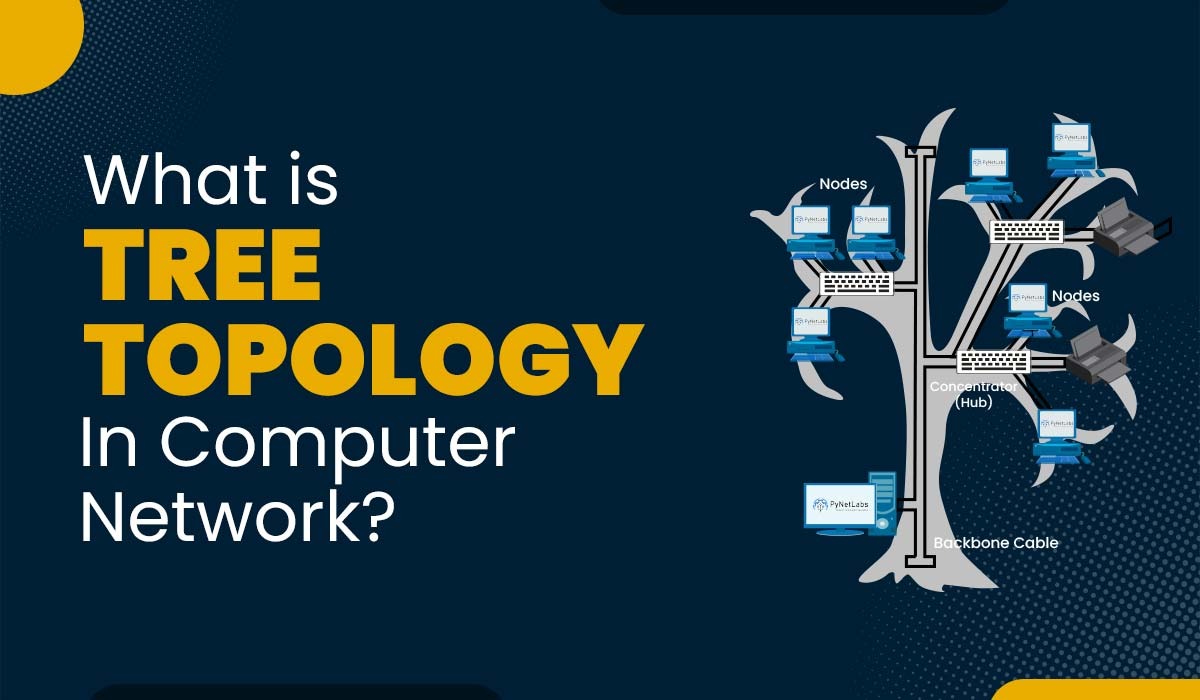
Image showing text -what is Tree Topology in Computer Network and an image of tree topology

Get Free Career Guidance

Categories

Introduction

Computer networks consist of interconnected devices that are organized in different ways. The arrangement and communication between these devices are referred to as network topology. The network topology you choose affects how well the network works, how reliable and secure it is, and how easily it can grow. Common types of network topologies include bus, tree, ring, star, mesh, and hybrid. In this blog, we will focus on one type called tree topology. We will look into the definition of tree topology, its purpose, how it operates, and its different types, advantages, and disadvantages.

All these network topologies are very important for network engineers to connect their networks. That is why, these topologies are covered in the very beginning of your networking journey, i.e., CCNA Training.

Before getting into more details, let’s understand what exactly tree topology is.

What is Tree Topology in Computer Networks?
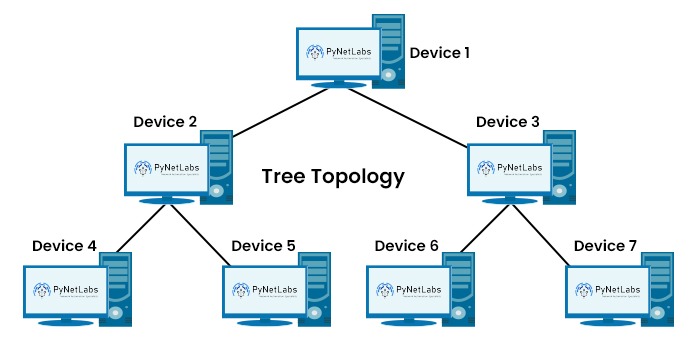
In network topology, tree topology is a type that is also known as the star-bus topology. A tree topology, or star-bus topology, is a hybrid network topology in which star networks are interconnected via bus networks. Tree networks are organized hierarchically, allowing each node to have child nodes.

A star network involves connecting all devices to a hub through a cable. The hub itself may be passive or active, depending on the presence of repeaters. On the other hand, a bus network connects all devices to a cable called the bus or backbone.

It merges the features of both star and bus topologies. It includes a node known as the root that connects to one or more star networks called branches. Each branch can further extend into sub-branches, forming a structure resembling that of a tree.

Tree Topology Diagram Explanation:

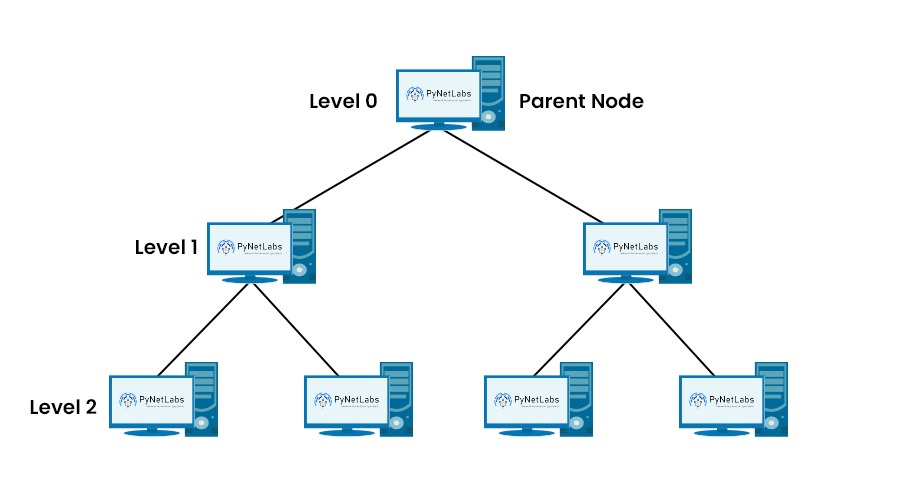
7 Computer Network Devices connected in a tree topology

Let’s now understand the purpose along with the application of this topology.

Purpose of Tree Topology

Tree topology is mainly used to build large, well-organized networks. It mixes ideas from star and bus topologies. Devices connect in layers, so data can move in a clear path. This makes the network easier to manage and expand. It also helps when you need to connect many devices without making the design messy.

Practical applications of tree topology:

  • Cable TV Networks (HFC): A main fiber line acts like the “trunk,” then branches into coaxial cables to reach homes. This helps providers deliver TV and internet to many users over a wide area.
  • Corporate and Enterprise Networks: A core switch sits at the top, with department or floor switches below it. Teams can add new sections as new “branches” without changing the full network.

Let’s get into the functioning of tree network topology.

How Does Tree Topology Work?

The working of tree topology can be defined over various steps. Below we have explained all the steps and crucial elements.

7 Devices connected in a tree topology explaining the 3 levels of hierarchy in tree topology

Root Node or Parent Node

When we talk about the tree network topology, the parent node acts as the root of the tree. This root node can be a hub, switch, or router.

Primary Nodes (Level 1)

These nodes are directly connected to the parent nodes. These are individual networks arranged in the form of star topology. Each primary node either represents a LAN (local area network) or a subnetwork.

Secondary Nodes (Level 2)

Primary nodes can be further branched out into secondary nodes. These are also the star-configured networks. Secondary nodes represent smaller subnetworks within the primary network.

Connection to Backbone

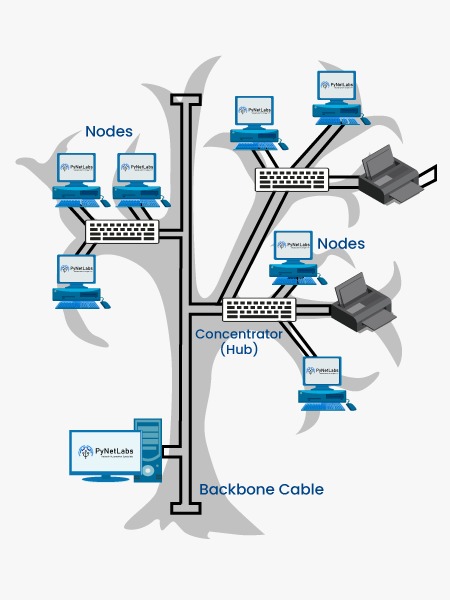
An image showing various nodes and other devices connected to the Backbone Cable

All the central hubs of the primary nodes are connected to a central backbone or bus. This backbone forms the trunk of the tree and allows communication between different primary nodes.

But the question that arises now is how data is transmitted in tree topology.

Data can be transmitted in a tree network topology in two ways. These are:

  • Within the individual star-configured networks: Devices that are in the same network segment or star-configured network can communicate with each other via a central hub.
  • Between different star-configured networks: When we talk about the communication between different star-configured networks, the data travels through the central backbone to reach the intended destination.

Note: The data that is transmitted in this topology can either be broadcast or point-to-point. The transmitted data can be unidirectional as well as bidirectional.

We now have a basic understanding of what tree topology in computer network is as well as its functioning. Let’s now move on to it’s different types.

Types of Tree Topology

Tree Topology can be classified into 3 categories. These are:

Bus Tree Topology

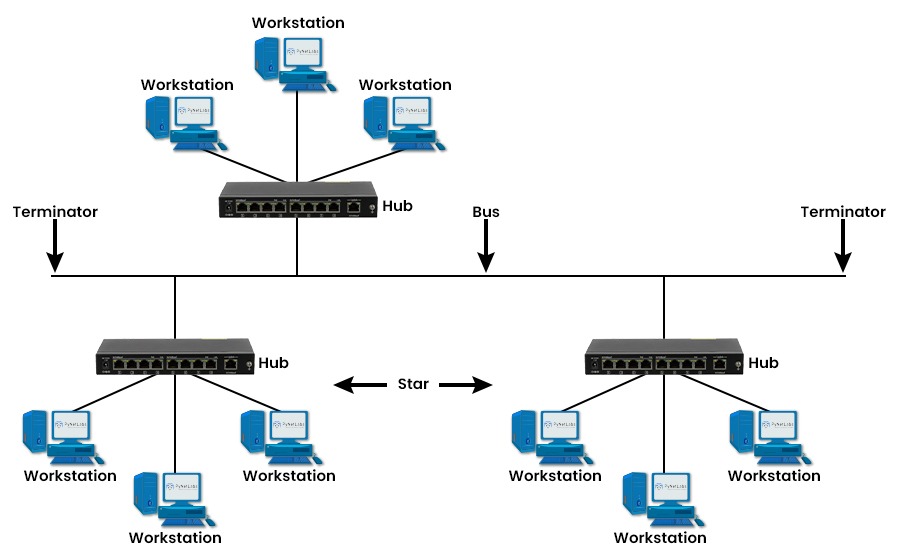
Shows 3 sets of 3 workstations connected to hubs and connected in Bus Tree Topology

In the bus tree topology, a single cable connects each star network to the bus backbone. This reduces the number of cables needed. It also limits the scalability and reliability of the network. If there is a failure, in the bus backbone it affects the network.

Bus Tree Topology advantages and disadvantages

Advantages

  • Uses one main backbone cable with branch segments.
  • Easy to add new nodes on a branch.
  • Costs less than mesh in most setups.
  • Works well for small or medium office layouts.
  • A fault in one branch may not stop others.

Disadvantages

  • If the backbone fails, many nodes lose access.
  • Traffic can slow down as more devices join.
  • Collisions can happen on the shared backbone.
  • Finding cable or connector faults can take time.
  • Backbone length limits where you can place nodes.

Cluster Tree Topology

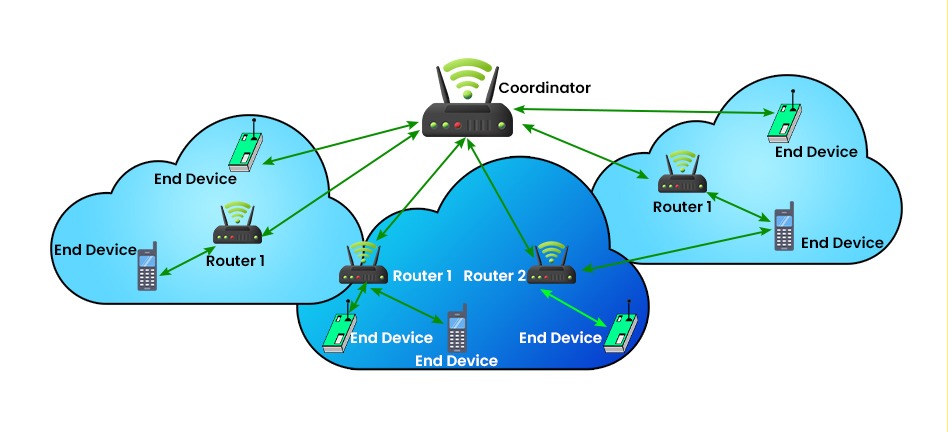
Shows various devices such as Router, end devices, etc. connected in a cluster tree topology

In the case of cluster tree topology, multiple cables connect each star network to the bus backbone. This increases redundancy as well as fault tolerance in the network. It also adds to the cost and complexity of cabling. Even if one cable fails, the network can still operate normally.

Cluster Tree Topology advantages and disadvantages

Advantages

  • Groups devices into clusters under a cluster head.
  • Scales well when the network grows in size.
  • Reduces traffic since most data stays in the cluster.
  • Saves power in wireless networks with smart routing.
  • Makes monitoring and control easier for admins.

Disadvantages

  • Cluster heads can become overload points.
  • If a cluster head fails, that cluster may go down.
  • Building and updating clusters adds extra overhead.
  • Some devices may drain battery faster than others.
  • Extra hops can add delay for time‑critical data.

Spanning Tree Topology

Spanning tree topology is a kind of spanning tree protocol that is organized or configured using the spanning tree protocol. The Spanning Tree Protocol is a network protocol that ensures a loop-free topology for bridged or switched networks.

Root Bridge

Spanning Tree Topology advantages and disadvantages

Advantages

  • Prevents network loops in Ethernet switching networks.
  • Allows backup links for better reliability.
  • Automatically blocks risky paths to keep traffic stable.
  • Recovers by re-opening links after a failure.
  • Fits well in real networks with many switches.

Disadvantages

  • Some links stay blocked, so bandwidth is unused.
  • Convergence can be slow in older STP versions.
  • Wrong settings can cause outages or odd behavior.
  • It does not balance load by default.
  • Troubleshooting multiple STP modes can get complex.

Features of Tree Topology

Here are some features of Tree Topology –

  • It allows adding more computers to a precise location by expanding the star network connected to the main backbone cable.
  • It is fault-tolerant and reliable because the failure of any computer on the network does not affect the operation of the entire computer network.
  • With a switch or intelligent hub, it provides a good network performance.
  • It is a better choice for small size LAN (Local Area Network).
  • It allows for great security, which can also be enhanced through Intelligent Hub.

Application of Tree Topology

Tree topology has several practical applications, the most common of which is its usage in computer networks. It facilitates the connection of networks, enabling communication and data exchange among devices. This topology is particularly beneficial in large-scale networks, such as those found in universities or corporate settings, where it links departments or buildings.

Another way tree structure is applied is in forming star networks where multiple devices are linked to a hub or switch. This configuration is commonly seen in households, workplaces, or small enterprises where devices connect to a router for networking purposes.

How does Data Transmission Work in Tree Topology?

When a device wants to send data to another device in tree topology, it follows a structured path. There is a central device known as the root or main hub. All other devices are connected to it, forming branches. It is possible that these branches may have smaller branches connected to them, which forms a hierarchical structure, as shown in the image.

A network hierarchy of 6 computers connected to each other

Now, if a device wants to send data to another device, the data transmission follows a specific path. First, the sending device sends the data to the directly connected device, i.e., the parent device. Once the data reaches the parent device, it is further transmitted to the root device. This is the case if the receiving device is on a different branch. Here, the flow of data is upward towards the root device.

If the receiving device is on the same branch, data is easily transmitted via the parent device to the receiving device or via the child device to the receiving device.

Below, we have explained the advantages and disadvantages of tree topology in detail.

Advantages of Tree Topology

This topology offers various advantages as compared to various other topologies. Some of these are:

  • Scalability: It is highly scalable as one can expand the devices and subnetworks by adding branches and levels to the network.
  • Flexibility: It can accommodate diverse sub-network types and sizes using different hubs and cables.
  • Reliability: One can easily isolate errors with in the network without impacting the root node. Hence, it is highly reliable as compared to other topologies.
  • Security: Security is everyone’s concern. It enhances security as well as privacy through channels or links. for data transmission.
  • Centralized control: It provides centralized control and management that simplifies network administration tasks such as monitoring, troubleshooting, and security management.
  • Efficient Data Transmission: It enables easy data sharing by managing traffic in particular branches. This reduces network congestion and enhances bandwidth usage, especially in networks with heavy traffic.
  • Segmentation: Segmentation allows the logical division of the network into smaller, manageable units that represent a different department, location, or function within an organization, providing isolation and security where necessary.
  • Point-to-point connection: In tree topology, the root node is connected point-to-point with every other node to provide dedicated bandwidth and reduce data collisions and congestion.

Disadvantages of Tree Topology

Some of the disadvantages of it are:

  • Complexity: The installation, configuration, and maintenance of this topology can be complex for multi-level networks.
  • Cost: The cost associated with setting this topology up is relatively high as we require cables, hubs, and various other network devices for its proper functioning. Hence, the overall cost increases.
  • Dependency: In this topology, if the root node and backbone stop working by any chance, then the overall network will be affected by it.
  • Performance degradation: Performance degradation, especially in downstream branches, occurs due to heavy network traffic or if the root node becomes overloaded.
  • Single point of failure: The root node behaves like a single point of failure, which means that its failure affects the entire network and makes it inaccessible.
  • Parent node affects child nodes: The parent node affects child nodes because the child node is dependent on the parent node, and if the parent device is faulty, then the child node cannot function.
  • Maintenance is not easy: In tree topology, the network structure is complex, which makes the maintenance process difficult, and maintenance of the parent device also becomes difficult due to the dependency of the child device on the parent device.

These are the Tree Topology’s Advantages and Disadvantages.

The Future of Tree Topology

Networking is changing fast, but tree topology isn’t going away. It is just moving into different roles.

The Shift in Data Centers

In big data centers, the old tree-style hierarchy is being replaced. Because servers talk to each other constantly (we call this East-West traffic), the “hops” in a tree create too much lag. Most modern data centers now use Spine-Leaf (Clos) architecture. This is a flatter design where every “leaf” switch connects to every “spine” switch. It’s much faster for server-to-server communication.

Standard for Offices and Campuses

For your average office building or college campus, the hierarchical tree is still king. Engineers use a Core-Distribution-Access model.

  • Access Layer: Where your laptop or phone connects.
  • Distribution Layer: Groups the access points together.
  • Core Layer: The fast “trunk” of the tree.

This setup is still popular because it is very easy to manage and troubleshoot.

A New Life in IoT

You will see tree structures popping up a lot in the Internet of Things (IoT). Protocols like Zigbee and Matter often use cluster trees. In a smart home, sensors might talk to a local hub, and those hubs talk to a central gateway. This creates a branching structure that helps save battery life for small devices.

Understanding Tree Topology is just the beginning. Concepts like switching, routing, STP, VLANs, and network design form the foundation of a successful networking career.

If you’re preparing for CCNA or planning to become a network engineer, structured training with real lab practice makes all the difference.

Frequently Asked Questions

Q1. What is tree topology and its advantages and disadvantages?

Tree topology is a type of topology that combines the features of both the star and bus topologies. Further at the top is the center or root node, which is further connected to primary or secondary nodes.

It offers advantages such as scalability, flexibility, reliability, security, and better performance. Apart from its advantages, it has disadvantages, like high cost and complexity.

Q2. Which cable is used in tree topology?

Tree topology typically uses a backbone cable (such as coaxial or fiber) combined with twisted-pair cables for star-configured branch connections.

Q3. What protocol is used in tree topology?

One of the protocols used in tree topology is STP, i.e., Spanning Tree Protocol.

Q4. Is tree topology still used?

Yes, tree topology is still utilized in many scenarios. One of many is connecting multiple branch offices to a central office.

Conclusion

A tree topology is a type of computer network where devices are organized in a hierarchical structure. It is a type of hybrid network topology as it combines the features of star and bus topologies. In this blog, we have explained tree topology and its purpose. We have also discussed its functioning and data transmission process. At the end of the blog, we have discussed its types, advantages, and disadvantages.

Any Questions?
Get in touch

Blog

Popular Courses

Leave a Reply

Your email address will not be published. Required fields are marked *

Free Course Guidance

Get Job Ready in IT,Automation, Networking & AI

Learn real skills, work on live labs, and become industry-ready with expert guidance.

What you’ll get

Trusted by

15,000+

IT professionals

1,500+

Placements PAN India

80+

Courses

CCIE

Certified trainers

Talk to a career Counsellor

Get a free personalised learning plan for your IT career goals.

Post Popup