



VXLAN (Virtual Extensible LAN) is a technology for virtualizing networks. It allows you to build Layer 2 networks over the top of a Layer 3 IP network. VXLAN was designed to address the problems with traditional VLANs, which are limited at 4094 segments, and usually struggle in large, modern data centres. VXLAN resolves this issue by the wrapping of Ethernet frames within UDP packets. Thus, one physical network is able to carry millions of separate virtual networks. Today, VXLAN sits at the core of cloud platforms and data center fabrics as well as software-defined networking.
In this blog, you will be able to understand what VXLAN is and how it operates and how its architecture fits, the benefits it offers, and how it is used in the real world.
What is VXLAN (Virtual Extensible LAN)?
Think of VXLAN in the same way you think of virtual machines. Hypervisors let one physical server helps in operating a number of virtual servers.
VXLAN is the same thing with networks. It lets a single physical IP network support thousands or even millions of isolated virtual networks simultaneously. Each of them functions as its own private network, regardless of the fact that connected devices are located in various buildings, racks or in cities.
VXLAN is an open standard that is defined in RFC 738. Nearly every major switch manufacturer as well as hypervisor and cloud service supports it. This wide-ranging support is one of the main reasons VXLAN became the standard overlay technology in modern networks.
Why Traditional VLANs Hit Their Limits?
VLANs worked well for a long time however, they were designed for a simpler and smaller era of network. Three issues stand out which is the reason why VXLAN in networking taking over as the preferred method for large-scale design:
The ceiling of 4,094: The VLAN ID is just 12 bits long. That results 4094 usable segments. A cloud service provider can burn through it with one massive customer base.
Spanning Tree waste: Traditional Layer 2 networks rely on Spanning Tree Protocol (STP) in order to stop loops. STP does this by blocking backup links. This means costly bandwidth remains idle.
The Layer 2 wall: VLAN tags die at the first router they meet. The stretching of one segment over racks or data centers can be a difficult design process.
How Does VXLAN Work?
The most effective way to comprehend what is VXLAN and how it works is to study one packet.
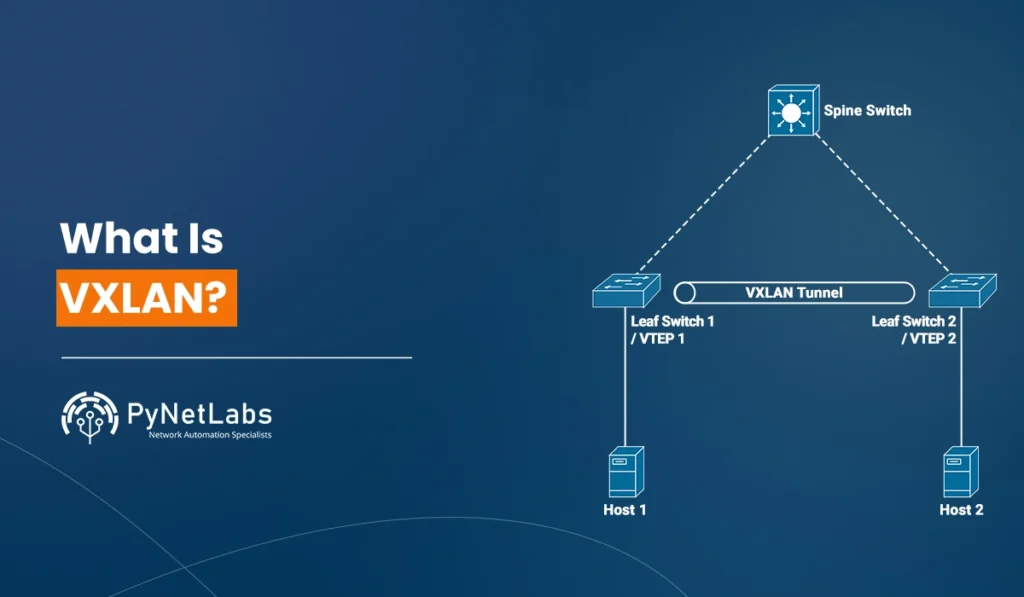
Imagine two virtual machines share the same logical network, however, they are connected to various physical switches. The physical network connecting these switches is based on IP routing.
Here’s what happens when a virtual machine is able to send traffic to another.
Build practical skills in Cisco Nexus, VXLAN, EVPN, and modern data center networking through hands-on training. Explore Cisco Nexus DC Training
Step 1: The Ethernet Frame Reaches the VTEP
The source workload sends a normal Ethernet frame. It does not need to understand VXLAN. The frame reaches a device called a VXLAN Tunnel Endpoint, or VTEP.
Step 2: The VTEP Determines the VNI
The VTEP identifies which VXLAN segment the source workload belongs to.
For example:
Finance network: VNI 5000
Development network: VNI 6000
Customer A network: VNI 7000
The VNI helps keep traffic from different logical networks separated.
Step 3: VXLAN Encapsulates the Traffic
The VTEP places additional headers around the original Ethernet frame.
The resulting packet contains:
- Outer Ethernet header
- Outer IP header
- UDP header
- VXLAN header
- Original Ethernet frame
- Original application data
- The VXLAN header contains the VNI.
Step 4: The Underlay Network Routes the Packet
After being encapsulated, the data is routed across the current IP infrastructure. The routers and switches in the middle don’t require understanding the original workload’s Layer 2 networks. They simply direct traffic between the destination and source VTEP IP addresses.
Step 5: The Destination VTEP Removes VXLAN
The target VTEP receives the packet, and then removes VXLAN UDP, IP, and other Ethernet headers. The original Ethernet frame will be restored. It is then then forwarded on to the workload that is intended for it.
For both workloads, it appears that they are connected via one Layer 2 network.
VXLAN Architecture: The Building Blocks
VXLAN architecture has a couple of essential elements. Each of them has a specific purpose:
VTEP (VXLAN Tunnel Endpoint): The device that is mainly used to encapsulate and decapsulate traffic. It may be a hardware switch (a hardware VTEP) or the virtual switch inside the hypervisor (a software VTEP).
VNI (VXLAN Network Identifier): A 24-bit segment ID. It gives you approximately 16.7 million virtual segments in comparison to 4094 VLANs.
Underlay network: A physical fabric for IP that is typically a spine leaf design. Its primary function is to transfer packets between VTEPs swiftly and effectively.
Overlay Network: It is the virtual layer 2 networks, which are layered on top. It is possible to create, modify, or remove it without touching the physical wiring.
VXLAN gateway: It’s a connection or a bridge between VXLAN segments and traditional VLANs which means that older equipment as well as servers with bare-metal components can join in.
Control plane: Early deployments depended on multicast flood-and-learn. This got complicated at the scale. Modern fabrics employ EVPN with BGP as control plane. EVPN allows VTEPs share MAC in addition to IP reachability directly, which reduces flooding. This allows ARP suppression and accelerates convergence.
VXLAN vs VLAN: What’s the basic difference?
Both technologies segment networks, but they function differently.
| Feature | VLAN | VXLAN |
| Standard | IEEE 802.1Q | RFC 7348 |
| Segment Identifier | 12-bit VLAN ID | 24-bit VNI |
| Maximum Segments | 4,094 | Around 16.7 million |
| Transport | Layer 2 | Layer 2 over Layer 3 using UDP |
| Loop Handling | Spanning Tree may block redundant links | IP routing and ECMP can use multiple active paths |
| Network Reach | Usually limited to a Layer 2 domain | Can extend across routed IP networks |
| Scalability | Suitable for smaller environments | Designed for large-scale environments |
| Best Fit | Campus and traditional networks | Data centers, cloud, and multi-tenant networks |
Key VXLAN Benefits You should know
Below, we have discussed some of the benefits that VXLAN offers.
Massive scale: Millions of segments instead of a few thousand.
Layer 2 anywhere: Stretch a segment across racks, halls, or data centers. Workloads move without new IP addresses.
Full link usage: The IP underlay uses ECMP routing, so every link carries traffic. Nothing sits blocked by Spanning Tree.
True multi-tenancy: Each tenant gets isolated traffic on shared hardware. One customer cannot see another’s data.
Hardware freedom: VXLAN runs over any network that can pass UDP packets. You keep your existing IP infrastructure.
Built for automation: Paired with EVPN and SDN controllers, entire virtual networks spin up through software, not cabling.
Real-World VXLAN Use Cases
Use cases for VXLAN are seen where flexibility and scale matter:
1. Data-center fabrics
The majority of modern spine leaf designs are made by vendors such as Cisco, Arista, and Juniper and run EVPN-VXLAN as their standard fabric.
2. Hosting and cloud providers
Many customers have the same physical equipment that is each sealed within its own VNI.
3. VVM Migration and DCI
Move a virtual device between racks or sites without altering its IP address. This ensures that sessions are active throughout maintenance or disaster recovery.
4. Network virtualization platforms
Platforms like VMware NSX build complete software-defined networks based on VXLAN tunnels that connect hypervisors.
5. Campus micro-segmentation
Large universities and large enterprises utilize VXLAN to carry users groups and security zones across buildings without rearranging their entire VLAN layout.
VXLAN Challenges You Should Plan For
VXLAN is not free of trade-offs. A few things deserve your attention before you deploy:
MTU planning matters. The extra headers add roughly 50 bytes per packet. Enable jumbo frames on the physical network from day one, or you will deal with fragmentation later.
BUM traffic needs care. Broadcast, unknown unicast, and multicast traffic can flood the fabric if left unchecked. This is exactly why EVPN, with its ARP suppression and controlled flooding, has become so popular.
Troubleshooting gets harder. Older monitoring tools cannot see inside the tunnels. You need VXLAN-aware tools to trace problems across the overlay.
The learning curve is real. The concepts are simple, but a full EVPN-VXLAN fabric demands new skills from the team running it.
Frequently Asked Questions
Q1 What is VXLAN and why is it used?
VXLAN is a virtualization method that tunnels Layer 2 traffic through IP networks. It is that is used to overcome VLAN’s scaling limitations.
Q2 Is VXLAN still used?
Yes, VXLAN is still in use. VXLAN is the preferred overlay technology used in the modern-day data center and cloud services usually combined by an EVPN controller plane.
Q3 What’s the difference between VXLAN and VLAN?
VLANs provide 4,094 segments within the same Layer 2 domain. VXLAN has 16.7 million segments that are spread across routed Layer 3 networks.
Q4 Is VXLAN Layer 2 or Layer 3?
VXLAN is a Layer 2 overlay that runs over a Layer 3 underlay that encapsulates whole Ethernet frames in UDP packets.
Conclusion
VXLAN has evolved from a simple workaround to the core of modern-day network design. By wrapping layer 2 frames within UDP packets, the system allows you to break beyond the VLAN ceiling of 4,094 segments, extends networks across all IP infrastructure, and keeps each physical link running. Its architecture, based upon VTEPs, VNIs, and an EVPN control plane, has become the most common pattern used by cloud computing, data centers, and large companies.