
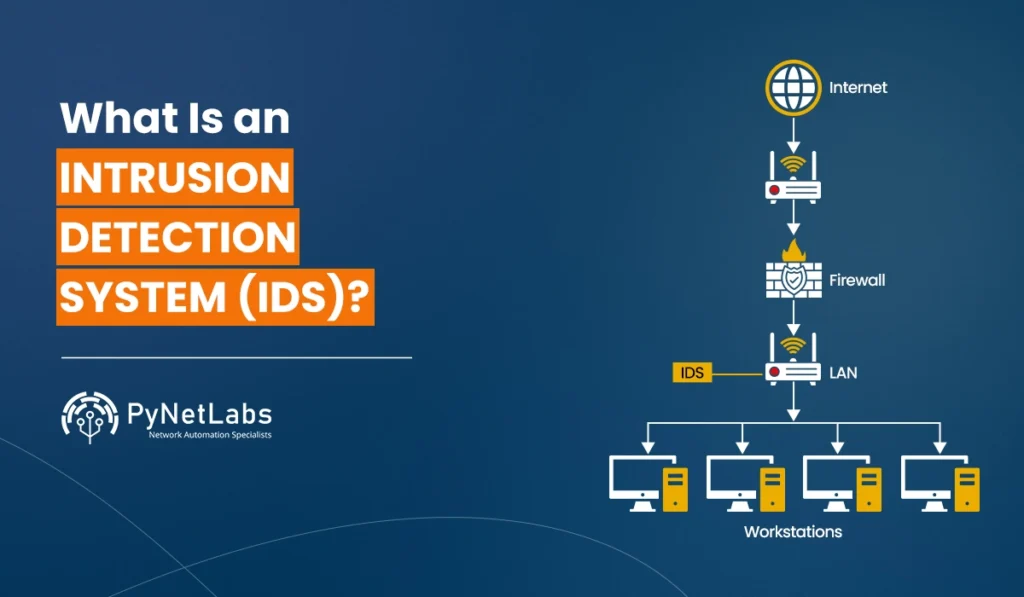




The Intrusion Detection Systems (IDS) monitor network or system activity in order to identify cyberattacks, unauthorized access and other suspicious activity. Instead of blocking all traffic automatically, it detects potential risks and warns security teams to investigate.
Modern IDS tools are able to detect endpoints, network servers, applications, as well as cloud-based environments. They can help companies identify suspicious actions that might get through other security controls. This is why intrusion detection is an essential element for network visibility within a broader network security strategy.
In this blog, we will help you understand what IDS is, its different types, its functioning, benefits as well as challenges associated with it.
What Is an Intrusion Detection System?
An Intrusion Detection System is also known as IDS refers to a security technology that monitors activity across the network or within a single system and flags any behaviour that may indicate an attack. Consider IDS in the role of a security watcher instead of an actual gatekeeper. A firewall determines whether connections should be allowed. An IDS looks at what is happening inside the network and around these connections.
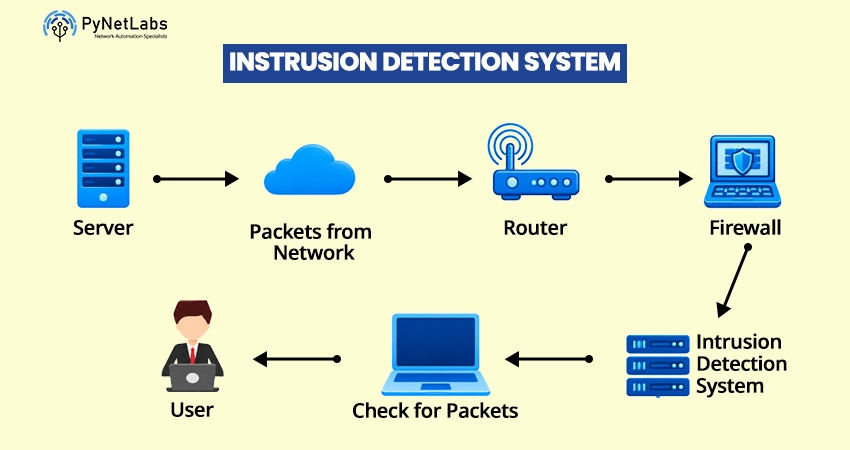
For example, it might be able to detect multiple requests to login, unusual communications among servers, suspicious changes to files or exploit activity or connections to known malicious destinations. You can further understand the concept via an Intrusion Detection System diagram. Below, you can see the IDS placement in a network environment.
Learn how IDS works in real-world networks and build a strong foundation in networking and security with a CCNA course.

Note: When an event matches an attack signature or is beyond the normal behaviour, the IDS send out an alert to security personnel to investigate.
How Does an Intrusion Detection System Work?
An IDS continually collects and analyses information from the environment it is monitoring. The precise information it collects is totally depends upon whether the IDS is monitoring the network, its endpoints, servers or even applications.
A typical IDS works around five stages. These are:
Activity is collected: The IDS receives connections, logs and packets to file events, as well as other security information.
Data is Analyzed: It examines IP addresses, protocols, ports payload characteristics, as well as requests, system events, and various other indicators.
Detection rules are implemented: Activity is compared to known signatures of threat or the expected behavior.
Suspicious activity is detected: Exploits, unusual traffic, sudden changes to files or other irregularities can cause the detection.
Alerts are issued: Security teams receive details about the incident so that they can look into the situation and then respond.
The Network IDS sensor is usually placed outside of the band. In lieu of processing original traffic, they examine copies of the traffic to ensure monitoring doesn’t interrupt normal network communication.
Types of Intrusion Detection Systems
IDS technologies can be classified according where they monitor activity and how they recognize a threat.
Network-Based Intrusion Detection System
A Network-based Intrusion Detection Systems (NIDS) is a system that monitors the flow of traffic across a network.
It can examine:
- IP addresses
- Ports and protocols
- Packet activity
- Network connections
NIDS can be used to detect suspicious activity that affects multiple devices or that is moving between networks.
Host-Based Intrusion Detection System
Host-based Intrusion Detection Systems (HIDS) detects any activity on one server, workstation or even an endpoint.
It can examine:
- System logs
- File changes
- Running processes
- User activity
HIDS is useful when signs of an attack exist directly on a specific device.
Signature-Based Intrusion Detection System
A Signature-based Intrusion Detection Systems (SIDS) detects threats by comparing activity to the known patterns of attack.
It can examine:
- Malware signatures
- Exploit patterns
- Malicious packets
- Known attack commands
SIDS works well with known threats; however it cannot be able to detect new attacks without an existing signature.
Anomaly-Based Intrusion Detection System
An Anomaly-based Intrusion Detection System (AIDS) detects any activity that is different from the normal usage or behaviour of the user.
It can examine:
- Traffic volumes
- Login behaviour
- Data transfers
- Connection patterns
AIDS may detect threats that are not known but unusual legitimate activities can cause false alarms sometimes.
Perimeter Intrusion Detection System
The Perimeter Intrusion Detection System (PIDS) is a system that monitors activity within the boundary of a network or an infrastructure.
It can examine:
- Inbound connections
- Access attempts
- Network probing
- Boundary traffic
PIDS is helpful to detect suspicious activity that targets exposed systems or network entry points.
Benefits of an Intrusion Detection System
Some of the benefits that IDS offer are:
Detects Threats in Allowed Traffic
Firewalls can allow legitimate services like HTTPS however malicious activity is still able to traverse them. An IDS also acts as an additional inspection layer to detect suspicious activity within the permitted traffic.
Spots Suspicious Internal Activity
In the event that a compromised device begins looking for servers or interacting in an unusual manner inside networks, IDS can help to identify the movement prior to spreading further.
Supports Faster Investigation
IDS alerts give security teams with important context, such as sources, destinations, the affected system and the detection rules. This allows security professionals to know what went wrong and respond quicker.
Adds Visibility across Security Tools
The alerts generated by IDS are delivered to SIEM platforms, and then compared to the firewall, endpoint and authentication information. This provides teams with a clearer image of the possibility of an attack.
Challenges and Limitations of IDS
Some of the challenges and limitation you should look out when using IDS are:
False Positives
Normal tasks like software deployments, backups, or vulnerability scans can appear suspicious and trigger unnecessary alerts.
Alert Fatigue
The excessive number of low-value alerts can confuse analysts and make significant threats more difficult to detect. Regular tuning is required to keep alerts effective.
Limited Visibility Into Encrypted Traffic
If the IDS is unable to examine encrypted traffic there are some security risks hidden in encrypted sessions might be difficult to spot.
Detection Without Prevention
A traditional IDS typically alerts security teams rather than stopping an attack. A second security control or a human reaction is necessary.
IDS vs IPS: What Is the Difference?
IDS and IPS use similar detection techniques, but they handle threats differently.
| Feature | IDS | IPS |
| Detects suspicious activity | Yes | Yes |
| Generates alerts | Yes | Yes |
| Automatically blocks traffic | Usually no | Yes |
| Common deployment | Out of band | Inline |
| Primary role | Detection and visibility | Detection and prevention |
An IDS tells you something suspicious is happening. An IPS can act on it automatically.
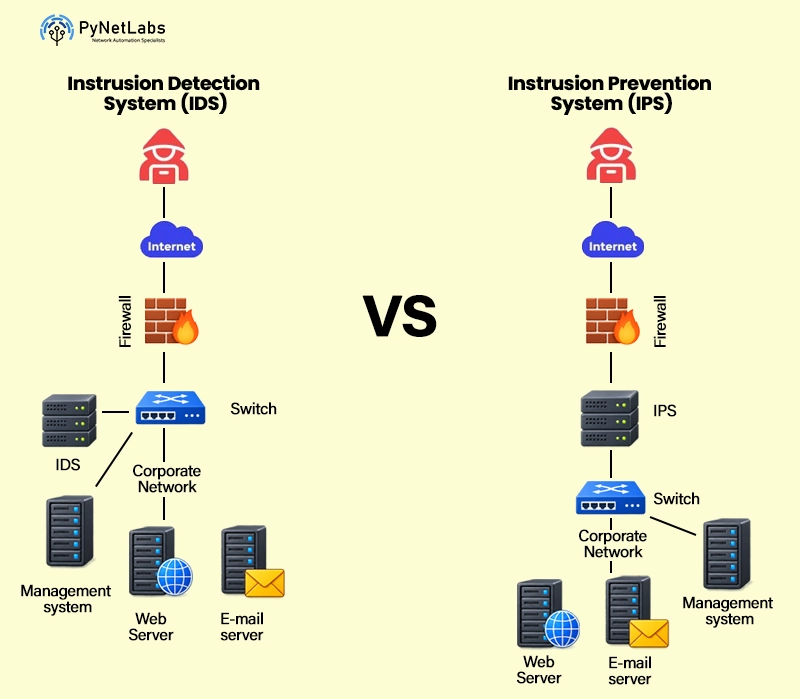
This difference also changes operational risk. An IDS false positive may create an unnecessary alert. An IPS false positive could block legitimate business traffic because the system is positioned to intervene.
Where Does IDS Fit in Modern Network Security?
An IDS should not operate as the organization’s only detection control.
It commonly works alongside:
- Firewalls
- Intrusion prevention systems
- Endpoint security or EDR
- Network Access Control
- SIEM platforms
- Identity and access controls
- Vulnerability management
- Incident response processes
Each provides a different layer of visibility or protection. Microsoft, for example, recommends using network IDS/IPS together with host-level detection or EDR when deeper endpoint visibility is required.
Conclusion
An Intrusion Detection System assists security teams in identifying suspicious activity across systems and networks before it goes undetected. It can identify signatures of attacks and unusual network behavior and activity, as well as malicious communications and other changes that demand investigation. The true value of IDS is its visibility. If it is placed in a proper manner and tuned, as well as connected to other security tools, it can help teams spot the activities that other controls might not be able to detect.
Frequently Asked Questions
Q1 What are the Four Types of Intrusion Detection Systems?
Four types of Intrusion Detection Systems are Network-Based Intrusion Detection System, Host-Based Intrusion Detection System, Signature-Based Intrusion Detection System, and Anomaly-Based Intrusion Detection System.
Q2 What’s the Difference Between IDS and IPS?
The most notable difference between IDS an IPS is in their functionality. IDS helps in informing about the happening of suspicious activity, whereas, IPS can act on it.
Q3 What is an Example of IPS?
The most common example of IPS is its role in stopping attacks like RCE. Another example includes blocking brute force login attempt and neutralizing email attachments attacks.
Q4 Which Tool is Used for Intrusion Detection?
There are multiple tools that are highly used for intrusion detection. These include Snort, Suricata, Zeek, and many others.